
SEO Audit: What It Is, How to Do It & Checklist
Is your website struggling to rank higher on Google? An SEO audit can help you find the hidden issues holding your website back.
An SEO audit is a comprehensive evaluation of a website to identify technical issues, content gaps, on-page problems, indexing issues, and off-page factors that may affect its visibility in search results. It also helps prioritize the actions needed to improve the website. Search engine algorithms and users’ behaviour are always changing, so the site that used to be top-ranked last year may fall in the rankings and nobody will even notice.
Looking for the reasons why your website isn’t ranking as it should? The answer lies in the form of an SEO audit, which will help to identify various problems related to the SEO of your website.
In this blog, we’ll discuss everything about an SEO audit, including what it is, how to do it, and the times when you need to conduct one.
What Is an SEO Audit?
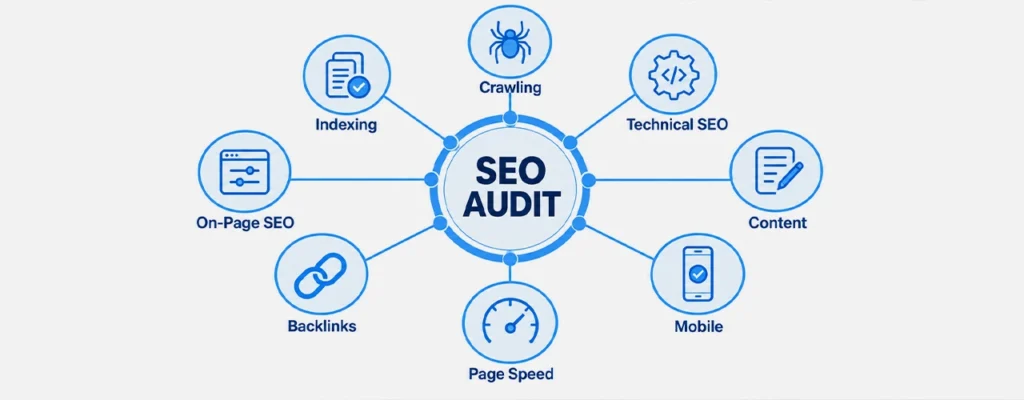
SEO audit is a comprehensive review of your website’s performance with respect to search engines. It identifies several factors related to technology, on-page optimization, content, and off-page optimization that can cause the site not to be visible on the Web.
Some basic questions that will be answered with the help of the audit are the following:
- Can the search engines crawl and index the pages?
- Are the pages optimized for the right search intentions?
- Are the title, headings, URLs, and internal links on your pages well-optimized for search terms?
- Is there any expert content to be published?
- Are backlinks appropriate and credible?
- What must be fixed first?
The aim of doing an audit is not just finding out mistakes. It includes identifying the mistake and its impact and the steps to be taken.
It also proposes conducting an additional audit:
- Following any major redesign of the website or other updates
- In case of a sharp decrease in organic traffic
- After any significant update of Google’s algorithms
- Before rebranding
Find Out Why Your Website Isn’t Performing
Identify the issues affecting your search visibility, rankings, and organic traffic with a detailed SEO audit.
Website Audit Checklist: How to Audit a Website
Step 1: Get Ready & Benchmarking
Have access to Google Search Console and Google Analytics. Make notes about your initial situation: organic traffic, most popular pages, conversions, load time, and backlinks. It will be needed to show that your efforts brought results. Before starting with any software, examine the website manually to understand its structure and to be able to filter out serious mistakes. Then use a crawling and SEO analysis tool such as Screaming Frog (up to 500 URLs free), Semrush, or Ahrefs to identify technical and on-page issues.
Step 2: Technical SEO Audit Checklist
- Robots.txt and sitemap: Robots.txt controls which URLs crawlers are allowed to request. Check that important pages are not accidentally blocked. Keep your XML sitemap accurate and up to date, primarily including canonical URLs that you want search engines to crawl and index.
- Indexing: Compare the pages indexed by Google (Google Search Console Pages report or use a site: search) and those you would like to be indexed. There are some exclusions, like thank-you pages.
- Duplicate site versions: Choose one preferred HTTPS version of your website and permanently redirect equivalent HTTP and alternate www/non-www versions to it.
- Response codes: Review 4xx and 5xx errors and fix important broken URLs. Redirect a URL only when a relevant replacement page exists. Use a permanent redirect when a page has permanently moved, while temporary redirects are appropriate for genuinely temporary changes.
- Accidental blocks: Check for accidental noindex directives, incorrect canonical tags, and other settings that may prevent important pages from being indexed correctly.
- HTTPS: Verify that all your web pages are secured with the HTTPS protocol.
- Search Console: Manual Actions: Search for any penalties or security issues
- Mobile Usability: Check that the website is responsive, easy to navigate on mobile devices, and provides the same important content and functionality across devices.
- Core Web Vitals: Check Core Web Vitals using PageSpeed Insights and Google Search Console, paying attention to LCP, INP, and CLS.
Step 3: On-Page SEO Verification
Every web page must be given a unique title tag, which preferably needs to be 50-60 characters long, with a description tag of 150-160 characters. Before the character count, there is a need to count the pixels. Use a clear main heading for each page and organize supporting sections with logical H2 and H3 headings . Keep URLs concise, descriptive, and readable, using hyphens to separate words and avoiding unnecessary complexity. No page should be an orphan page. Use relevant internal links to make important content easy for both users and search engines to discover.
Step 4: Content Quality
Look for any duplicate content and thin content. Look for duplicate or substantially similar content using crawling tools and manual review. Resolve the duplicate content problem through rewriting, redirects, or by using a canonical tag.
The next thing is to check whether the content on each webpage is relevant to what the user is looking for. Keyword research and competitor analysis will help you find any content gap.
Also evaluate whether the content demonstrates appropriate experience, expertise, authoritativeness, and trustworthiness. These qualities are especially important when users rely on content for accurate or important information.
Step 5: Evaluation of Off-Page SEO
The quality, not quantity, of backlinks is what counts here. Opportunities must be sought, such as mentions without backlinks, competitors getting links that you don’t, and broken backlinks that you can capitalize on. Opportunities must be sought, such as mentions without backlinks, competitors getting links that you don’t, and broken backlinks that you can capitalize on.

SEO Audit Report Sample
A good report should identify the item that was examined, its status against best practices, and a recommended course of action. The following table illustrates this point.
Problem identified | Area | Priority | Recommended fix |
Missing title tags on service pages | On-page | High | Write unique, keyword-rich titles |
Four URLs load without redirecting | Technical | High | Redirect equivalent HTTP and alternate www/non-www versions to the preferred HTTPS URL |
Blog posts four clicks away from homepage | Internal linking | Medium | Add relevant links from category, hub, and related content pages |
Contact page lacks schema markup | Technical | Low | Implement appropriate structured data and validate it |
Prioritize recommendations based on potential impact, urgency, affected pages, implementation effort, and business importance. After implementing the fixes, compare the results with your original benchmark.
When Do You Need to Perform an SEO Audit?
You need to perform an SEO audit when implementing an SEO strategy, when you want to redesign a website, when transferring to a new website platform, when you encounter unexplained changes in your traffic, and when you inherit an existing website.
SEO auditing is also needed for the purpose of conducting periodic checks. The frequency will depend on the degree of change of the website and its competitiveness.
How to Choose the Right Social Media KPIs
Start with a business question: “Are we getting more qualified demo requests?” or “Are nearby customers finding our new location?” Choose the outcome, then work backward to the social action and the earlier signal you can measure.
Define each KPI in the reporting plan: platform, campaign, organic or paid scope, formula, data source, owner, target, and review period. Record the baseline before setting a target. A new account, a mature community, and a seasonal business should not use the same expectation by default.
Match the KPI to the customer’s stage. Discovery calls for reach among relevant people. Consideration calls for useful engagement and qualified visits. Decision calls for leads, sales, and acquisition economics. After purchase, service interactions and resolution become important. Keep secondary numbers available for diagnosis without putting all of them on the executive scorecard.
SEO Audit Services: DIY or Hire a Professional?
A DIY audit may be suitable for a small website with a relatively simple structure and straightforward SEO requirements. You should think about professional SEO audit services if your website is large, you have observed a fall in traffic but cannot understand why, and you are planning a migration.
The time differs. According to Impression, a comprehensive technical audit requires from one day up to several days, while Thrive offers a period between 30 minutes and six weeks depending on size and level of detail. You should ask any provider if they use several tools in combination with manual analysis, provide you with a prioritized report, and understandably explain their results.
Common SEO Audit Mistakes
- Thinking of it as a once-in-a-while thing: SEO audit requires continual review.
- Tackling easy problems first: Look at things that influence indexing, crawling, and click-through.
- Based on the automated result score: The results of a tool need interpretation by human beings.
- Using new URLs without redirection: The old URLs become 404 pages and lost links.
Final Thoughts
An SEO audit gives you a clear picture of how well your website is performing in search and where improvements are needed. From technical issues and indexing problems to content gaps, on-page optimization, and backlinks, a thorough audit helps you identify what may be limiting your organic visibility.
The key is not to fix everything at once. Prioritize issues based on their potential impact, implement the necessary changes, and track your results against your original benchmark. Regular audits can also help you identify new issues before they have a significant effect on rankings and organic traffic.
If you’re unsure why your website is losing visibility, traffic, or rankings, a professional SEO audit can help uncover the underlying issues and provide a clear, prioritized roadmap for improvement.
FAQ's
What does SEO Audit mean and how important it is?
The SEO audit is conducted to check the technical SEO, content, links, and other aspects of search engine optimization of the website.
How Should I Conduct an SEO Audit of My Website?
One has to check crawlability, indexing, page speed, mobile usability, titles, headings, content, internal linking, and backlinks.
Which are the elements that should be included in a technical SEO audit checklist?
Such a checklist should contain crawlability, indexability, robots.txt, XML sitemap, redirects, canonicalization, HTTPS, mobile usability, Core Web Vitals, broken links, and Structured Data.
What is included in an SEO audit report?
An seo audit report sample will have website issues, affected web pages, priority of such pages, and solutions concerning technical SEO, content SEO, on-page SEO, and backlinks.
In what situations should one consider using SEO Audit Services?
SEO Audit Services may be used when there are drops in rankings/traffic, when a website undergoes redesign/migration, or when it is necessary to find SEO issues.