My Website Is Not Showing on Google Search? 10 Reasons and Fixes
Key Takeaway
- Give a new website a little patience, because Google takes time to show it.
- Indexing errors, or rules that restrict crawling, can keep your pages out of sight entirely.
- Submitting a sitemap makes discovery easier. Indexing, though, is never promised.
- Strong content and clean technical SEO both support visibility.
- Google Search Console shows what went wrong and helps you fix it.
Have you published your website but cannot find it on Google? That hurts traffic, leads, and online sales. Still, it does not always mean the site is broken. Technical errors, indexing settings, and weak content can all hold back visibility.
Google Search Central says crawling can take anywhere from a few days to several weeks. Even after that, Google makes no promise that a page will appear.
For the concern of why my website is not showing on Google search, finding the cause comes first. The right fix follows from that.
My Website Is Not Showing on Google Search? Find the Reasons and Fix Them

To answer ‘Why isn’t my website showing up on Google?’ you need a little background. Google works in three stages: crawling, indexing, and serving results. A problem at any one of them can wipe out your visibility.
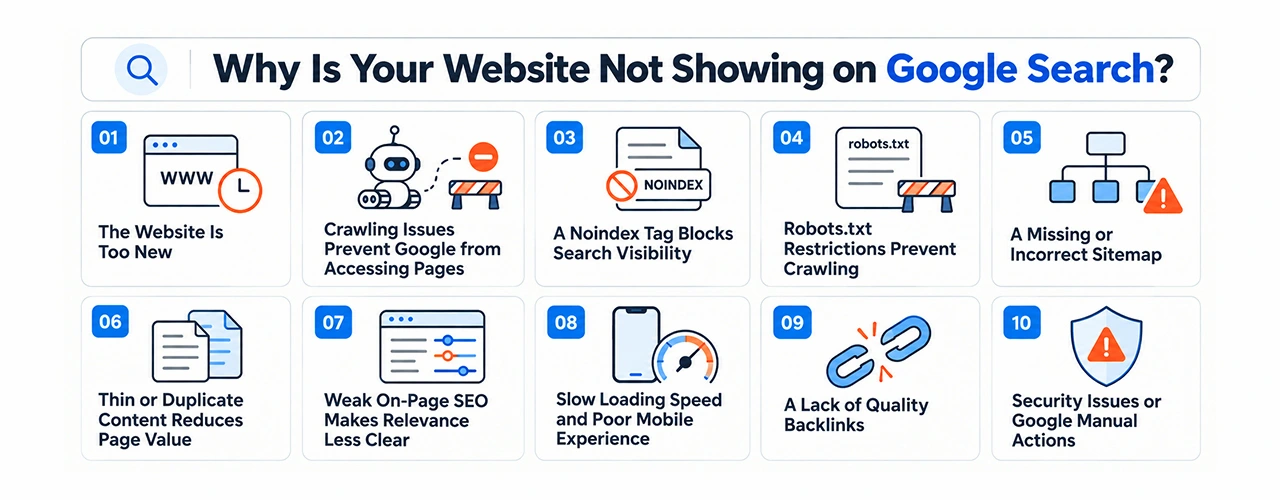
Below are ten common reasons, each with a practical fix.
1. The Website Is Too New
Google may simply not know your site exists yet. This happens a lot when very few other websites link to it.
How to fix it: Set up Google Search Console and verify your website. Then submit an XML sitemap. Use the URL Inspection tool to request indexing for your key pages. Indexing is still not guaranteed.
2. Crawling Issues Prevent Google from Accessing Pages
Server errors, broken links, and restricted access can shut Google out of important pages.
How to fix it: Search Console lists the pages that aren’t working, so begin there. Each URL should open without trouble and return a successful status. When server errors hang around, your hosting company or web developer has to sort them out.
3. A Noindex Tag Blocks Search Visibility
A noindex is a signal sent to search engines to keep a page from appearing in their results. Many developers sometimes forget to remove the noindex directive after the build.
How to fix it: Look at the page’s HTML for a noindex meta tag, or an HTTP header that does the same job. If the page should be in search results, take it out. After that, inspect the URL once more.
4. Robots.txt Restrictions Prevent Crawling
Crawlers check robots.txt before they look at anything else on your site. If one rule is wrong, key pages can get blocked without you noticing.
How to fix it: Open yourdomain.com/robots.txt and take a look through the set of rules. Delete any restrictions you notice on core pages. Keep in mind that just because you allow a crawler does not guarantee indexing.
5. A Missing or Incorrect Sitemap
A sitemap points Google toward your important URLs, especially on large websites. If it’s old or can’t be reached, Google struggles to find your pages.
How to fix it: Create an XML sitemap that includes valid and working URLs only. Add it in Search Console and see whether any errors show up. Broken links and pointless redirects shouldn’t be sitting in there at all.
6. Thin or Duplicate Content Reduces Page Value
Pages with little useful information rarely get far. Duplicate content adds another problem, because Google struggles to pick the right page for a search.
How to fix it: Write original content that truly answers your readers’ questions. Add practical examples and accurate details. When several pages cover one topic, improve them or merge them.
7. Weak On-Page SEO Makes Relevance Less Clear
If the page title is missing and the headings are not clear, search engine left guessing what the page is about. Poor keyword research exacerbates the situation further.
How to fix it: Give the page a clear, descriptive title first. Then write headings that spell out exactly what each section is about. Add relevant search terms only where they fit, and link to related pages on your site. A helpful meta description is worth adding too. Avoid keyword stuffing, as endless repetition never makes content better.
8. Slow Loading Speed and Poor Mobile Experience
A page that takes too long to load drives people away. Poor mobile usability only adds to the problem, since Google mainly looks at your mobile version when indexing.
How to fix it: Large images and extra scripts slow a page down more than most people expect. Compress the images and remove what you don’t use. Choose a responsive layout, then test with Google PageSpeed Insights. Check that text, buttons, and menus still work properly on small screens.
9. A Lack of Quality Backlinks
Think of each link from a relevant website as a vote of trust. It leads search engines to your page and explains its topic. A new site with almost no external links gets overlooked badly.
How to fix it: Links usually follow good content. A detailed guide or a small piece of original research can earn plenty of them. Get to know others in your field, but never pay for spammy links.
10. Security Issues or Google Manual Actions
Hacked pages, security flaws, and breaches of Google’s spam policies can badly damage visibility. A manual action may also limit your presence in search results.
How to fix it: Open the Manual Actions and Security Issues reports in Search Console. Resolve every reported problem. Submit a reconsideration request if one is required.
Get Your Website Showing on Google
Improve your website visibility and reach more potential customers.
How to Diagnose a Website Not Appearing on Google
If why can’t I find my website on Google keeps bothering you, check the evidence before changing anything. This table helps you spot likely causes.
| What you notice | Possible cause | Recommended action |
| No pages appear in search | Discovery or indexing problems | Submit a sitemap and inspect key URLs |
| One important page is missing | A page-level restriction | Check its indexing status |
| Pages are crawled but not indexed | Content or indexing concerns | Review quality and technical settings |
| The site appears for its name only | Limited relevance for other queries | Improve content and on-page SEO |
| Pages disappear unexpectedly | Technical, security, or spam issues | Review Search Console reports |
Google’s guide to how Search works explains that crawling, indexing, and serving are separate processes. So a crawled page may still never get indexed or ranked.
What to Check Before Making Changes
When why does my website not show up in Google search becomes a repeated headache, follow these steps:
- Search for site:yourdomain.com to see which pages are indexed.
- Run URL Inspection on your important pages.
- Look for errors in the Page Indexing report.
- Confirm that your sitemap is accessible.
- Review content quality, internal links, and indexing settings.
- Watch for changes instead of requesting indexing again and again.
The site: search gives only a rough picture of indexed pages, not a full list. Search Console shows far more detail.
Improve Your Website’s Search Visibility
If why won’t my website show up on Google is still unanswered, work out where the trouble lies. It could be crawling, indexing, or ranking. Fix that root problem, then track your results. Improvements can take a while to show.
At TechHaz, we help businesses grow their online presence through website development and digital marketing. If my website is not showing on Google search sounds like your problem, a website and SEO audit can help. It finds hidden technical issues, weak content, and missed organic opportunities.
FAQ's
My website is not showing on Google search, why?
Google probably hasn’t indexed it yet. That’s the usual story. Search Console will tell you if crawling errors or blocked pages are in the way, so look there before anything else. Sort out whatever it flags, and only then ask for indexing.
Can changing a domain affect rankings?
It can, and sometimes the drop is painful. A domain migration goes wrong when redirects are broken, internal links point to old URLs, or canonical tags are set incorrectly.
Does website redesign affect search visibility?
Generally, yes. Once URLs, content, or navigation change, rankings tend to wobble. Plan the migration carefully before you touch anything, and keep every important page alive.
Should every page be indexed?
Not really. Private pages, duplicates, and thin, low-value pages rarely need a place in search results.
Can social media improve search rankings?
Social media puts your content in front of more people, and they can share it. That alone will not lift your rankings or get a page indexed, though.
Let’s Talk About Your Project
Recent Blog
-
Top Content Gap Analysis Benefits for Growing Your Website Traffic -
AEO vs GEO vs SEO: Which Strategy Is Best for Your Business? -
How to Find DoFollow Backlinks Using Free SEO Tools -
Inventory Management Software in Dubai: Features, Benefits & Costs -
Online Reputation Management: Strategies, Benefits & Best Practices