PHP Security Alert October 2026: Is Your Website Affected?
Key Takeaway
- Check whether your website’s PHP runtime includes fixes for CVE-2026-109618 and CVE-2026-109619.
- Ask your hosting provider to confirm the exact patched version or vendor package build serving your website.
- Update PHP separately from WordPress, plugins, themes, or Laravel.
- Apply updates promptly, verify required restarts, and test essential functions such as checkout, login, and enquiry forms.
- Investigate suspicious activity separately, patching does not remove an existing compromise.
The PHP security alert October 2026 concerns two critical flaws in the software that runs many websites and business applications. On 21 October, PHP released updates addressing vulnerabilities that can allow attackers to execute code without signing in. If your business uses PHP, ask your hosting provider or developer to confirm that the fixes are running on every relevant system. A website that looks normal may still need attention. Equally, an affected PHP installation does not prove that someone has broken into it. The immediate job is to verify exposure, apply the appropriate update, and investigate suspicious activity where warranted.
What is the latest PHP security alert?
Two vulnerabilities, CVE-2026-109618 and CVE-2026-109619, can enable unauthenticated remote code execution under particular conditions. Fixed upstream releases are PHP 8.2.35, 8.3.36, 8.4.27, and 8.5.12. Website owners should urgently confirm patch status with their technical team, including whether a vendor backport applies.
Start with the hosting account serving your live website. Ask for the exact PHP package build and confirmation that it includes fixes for both CVEs.
Could Your Website Be at Risk?
Don’t wait for vulnerabilities to become a bigger problem. Check your website today.
Latest PHP security news: what happened, and when?
PHP gave advance notice on 20 October 2026, followed by its security releases and detailed announcement on 21 October. The UK’s National Cyber Security Centre also published its alert on 21 October, urging organisations to identify PHP systems and take action. Those are publication and release dates, rather than proof of when attacks began.
PHP critical vulnerabilities 2026: what do the two flaws actually do?
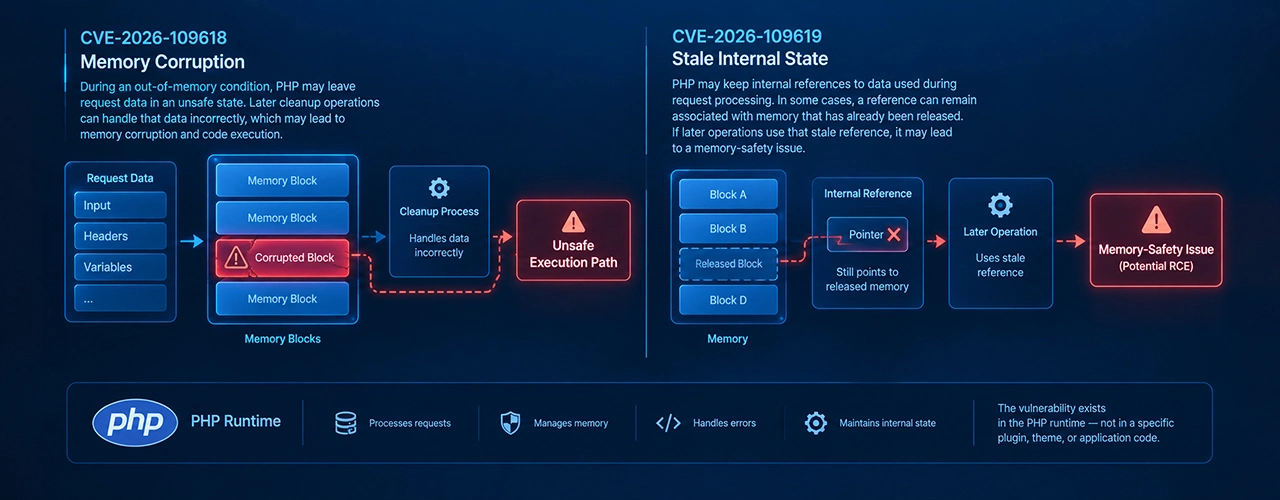
CVE-2026-109618: memory handling goes wrong
PHP can interrupt a request when it runs out of memory. In affected situations, that interruption leaves internal request information only partly prepared. Cleanup code may then handle invalid memory as though it were valid, creating an opportunity for remote code execution. The upstream advisory rates the issue Critical, 9.2 under CVSS v4.0, and confirms exploitation against Apache mod_php. Exploit reliability depends on the build and environment.
CVE-2026-109619: a worker reuses stale information
A PHP worker can retain references to information from an earlier request after the underlying memory has been freed. A subsequent request handled by that worker may use those references before normal initialisation clears them. This issue also carries a Critical, CVSS v4.0 score of 9.2. Its advisory describes confirmed remote code execution paths involving mod_php and PHP-FPM. Using FPM therefore does not establish that a site is unaffected.
Which PHP versions need updating?
For standard upstream releases, use the following branch-specific reference.
|
PHP branch |
Affected upstream releases |
First fixed upstream release |
|
8.2 |
Earlier than 8.2.35 |
8.2.35 |
|
8.3 |
Earlier than 8.3.36 |
8.3.36 |
|
8.4 |
Earlier than 8.4.27 |
8.4.27 |
|
8.5 |
Earlier than 8.5.12 |
8.5.12 |
|
8.1 and older |
Require assessment against vendor guidance |
Move to a supported branch or verify an applicable vendor fix |
Package builds matter. A vendor may apply a security fix without changing the underlying PHP version displayed by an application. There is an important qualification for older installations: PHP’s announcement includes exceptional minimal source backports for 7.4, 8.0, and 8.1. These do not restore normal upstream support for those branches. Ask who maintains your package and whether its fix covers both issues.
Could your WordPress, Laravel, or online store be affected?

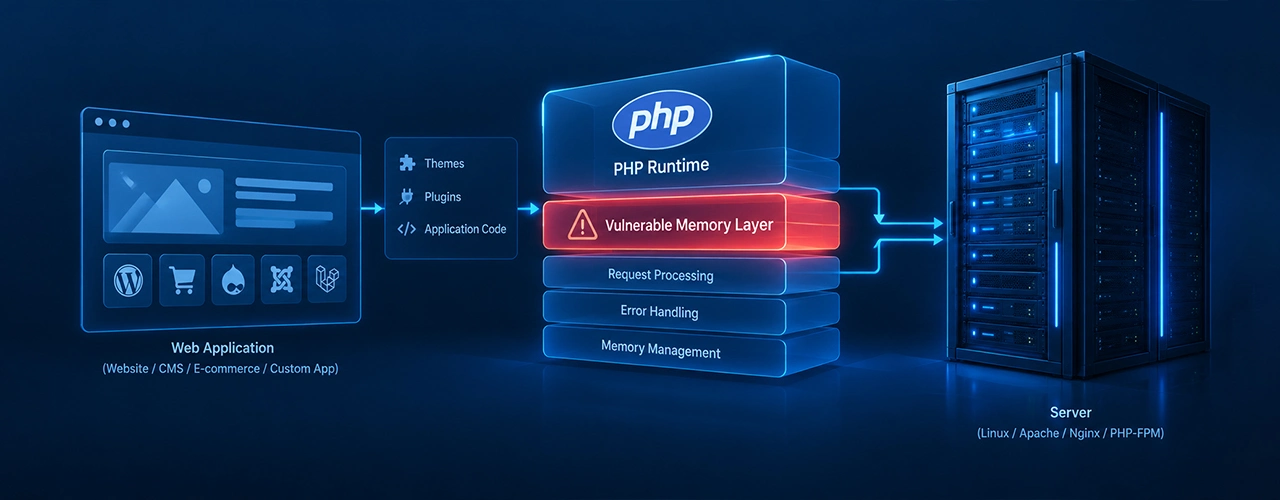
Assess the PHP runtime beneath the application. A WordPress website, Laravel application, custom customer portal, or PHP-based shop needs its own runtime and deployment checked. Naming the framework alone does not establish patch status. For WordPress, PHP is installed on the hosting server. Updating WordPress, themes, and plugins is a separate task from updating that server runtime. WordPress’s own guidance directs owners to their host for PHP changes.
Shared hosting customers should request confirmation from their provider. VPS and cloud customers should establish whether the provider or their own administrator manages runtime updates. Managed hosting arrangements also need checking against the service’s actual responsibilities.
Containers add another step: a patched image must reach the running application. Google Cloud’s guidance, for example, requires rebuilding and redeploying customer-managed container images; automatic updates depend on the particular service and configuration.
How to check your website’s PHP version and patch status
For website owners
Open your hosting dashboard and find the PHP setting for the specific domain. In WordPress, go to Tools → Site Health → Info → Server to see the reported PHP version. Treat that number as a starting point, then ask your host about the package’s security status.
Avoid accepting “we use PHP 8” as a complete answer. You need the patch release or vendor build, plus confirmation that your domain uses it.
For developers and administrators
The following command reports the version of the PHP executable selected in your shell:
php -v
PHP documents -v as its version option. This command alone does not establish which runtime handles browser requests. Inspect the website’s handler, FPM pool or equivalent service, installed package revision, and running deployment. Use private administrative checks rather than leaving a public configuration page online.
What website owners should do now
Use this checklist to organise the response with your technical team:
- List the systems to check. Include live websites, subdomains, administrative tools, and products that bundle PHP.
- Find the applicable advisories. Match the runtime to its operating-system, hosting, or package vendor.
- Confirm exposure and patch status. Record the installed build and the fix it contains.
- Prepare and deploy the update promptly. Assign a responsible person and a completion time.
- Verify the running services. Check every relevant server, worker pool, and application instance.
- Test business functions. Include login, checkout, enquiries, uploads, and important integrations.
- Review suspicious activity where warranted. Escalate findings rather than assuming an update resolves them.
- Record the outcome. Keep the deployment time, package details, and verification results together.
The NCSC specifically recommends prioritising internet-facing systems and checking third-party products with embedded PHP. Use the checklist to support that urgent work.
What if you cannot update immediately?
Have your administrator assess the temporary controls in both upstream CVE advisories. They address particular attack paths and require careful configuration; they do not fully resolve the vulnerabilities. Do not make memory-management changes casually.
The NCSC recommends considering taking a system offline if updates and temporary mitigations cannot be applied promptly. Decide who can authorise that step before an emergency forces the issue. A security plugin or WAF should not be treated as proof that the runtime is patched.
Questions to ask your hosting provider or developer
- Which exact PHP version and package build serves this domain?
- Does it contain verified fixes for both CVEs?
- Have all relevant servers, containers, and worker pools been covered?
- Have required restarts or redeployments completed?
- Which business functions were tested afterwards?
- Was suspicious activity found, and does anything need further investigation?
Ask for the answers in writing so there is a clear record of what was checked.
How TechHaz can help
TechHaz provides web application development, IT support, and cybersecurity assessments. If you need help organising a PHP maintenance response, contact the team to discuss your environment and agree the scope of assessment, hosting coordination, compatibility checks, and update validation.
FAQ's
Does this alert mean my website has been hacked?
No, Affected software creates exposure. Establishing whether an attack succeeded requires investigation of your environment and evidence.
Which versions contain the fixes?
The upstream fixed releases are listed in the version table above. For vendor-maintained packages, confirm the relevant patched build in that vendor’s advisory.
Does updating WordPress also update PHP?
No, PHP is managed at the hosting-server level. Ask your host to confirm its status separately from WordPress updates.
Does the vulnerability affect Laravel websites?
A Laravel application running on an affected PHP installation needs assessment. The framework name or version alone cannot establish that its runtime has been patched.
Can my hosting provider apply the patch?
Often, but responsibility depends on your hosting agreement. Ask who will install it and who will verify the running website afterwards.
What if my application uses unsupported PHP?
Check for an applicable maintained vendor fix while planning migration to a supported branch. Do not assume that a package is protected because the application still works.
Let’s Talk About Your Project
Recent Blog
-
Best Digital Marketing Companies in Abu Dhabi for 2027 - 28 -
PHP Security Alert October 2026: Is Your Website Affected? -
Best Instagram Lead Generation Strategies to Grow Your Business -
B2B LinkedIn Marketing Strategy: 10 Ways to Generate Qualified Leads -
How to Sell on TikTok Shop: A Beginner’s Guide to Getting Your First Sale